
One ID per person.
Every document behind it.
Give every patient, employee or student one profile: a QR-linked ID card and a secure vault of their documents, with role-based access and a log of every view and update.
- QR-linked ID card
- Document vault
- Role-based access
- Audit log
Why teams switch
Identity in one place, documents in ten. ID Vault joins them.
Most organisations keep a person's ID, files and access history in different places. That costs time at the front desk and confidence in every audit.
Records are scattered
Paper files, shared drives and inboxes. Staff chase the same document across departments.
With ID Vault
One profile per person. Search it and pull the right document in one place.
Nobody trusts the copy
Duplicate submissions and copies that disagree. Nobody is sure which file is current.
With ID Vault
Identity, documents and timestamps live together, so you can trust the record you open.
Access is all or nothing
Either everyone can open everything, or access depends on who has the folder.
With ID Vault
Access by role, branch or department, and a log of who viewed or changed what.
How it works
One card opens one verified record
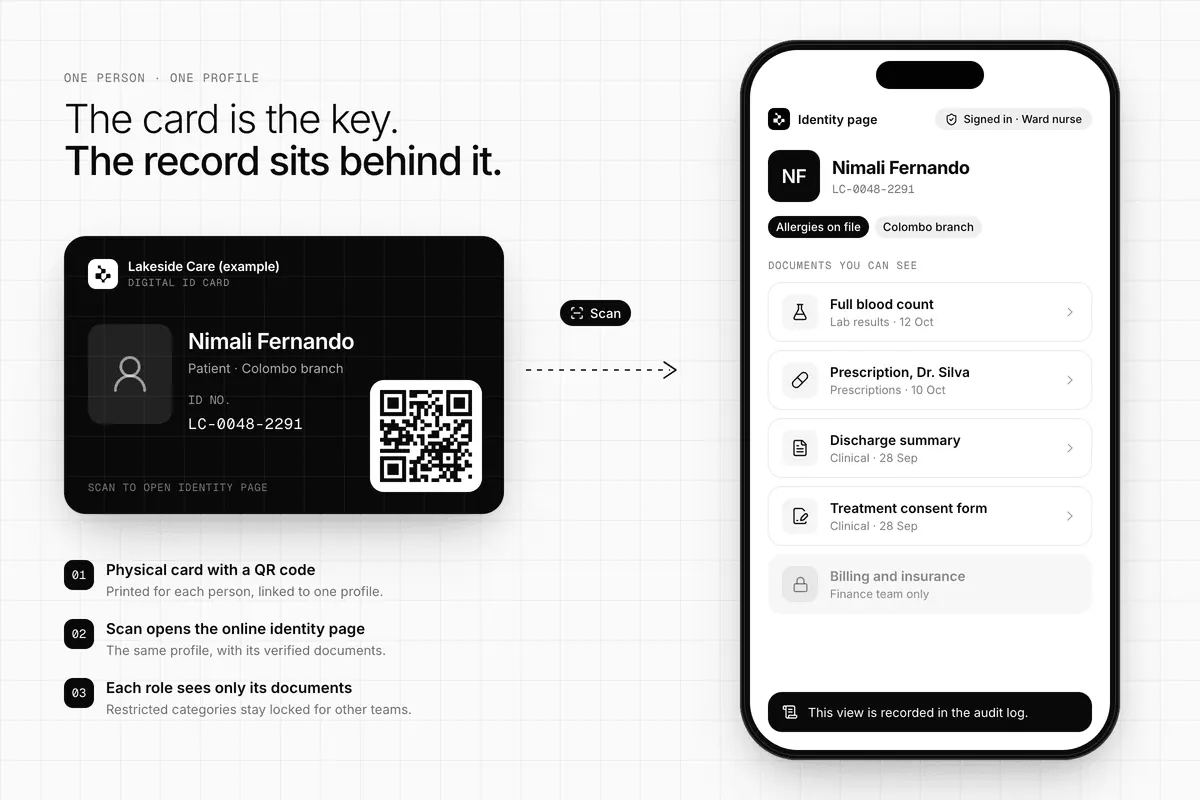
Each person gets a single profile. Their physical card carries a QR code that opens their online identity page, and the page shows the documents your role is allowed to see.
- A physical card, a QR code and an online identity page, all tied to one profile
- Documents filed against the person, not in a folder somebody owns
- Restricted categories stay locked for teams that don't need them
- Every view is added to the person's audit log
Document vault
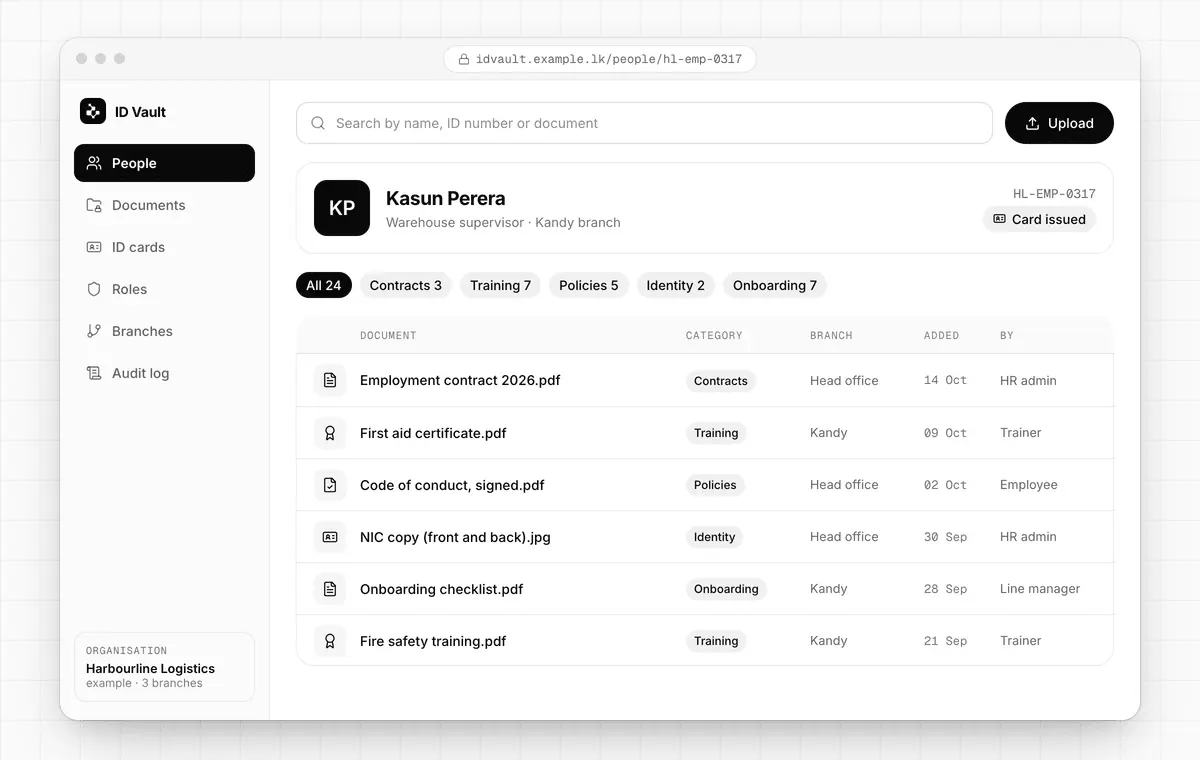
Every document, filed against the right person
Upload reports, forms, certificates and history once. Tag them by category, find them by name, ID number or document, and keep the whole history in one place.
- Document categories that match how your organisation works
- Lifecycle workflows for documents that change over time
- Central records with branch-level teams and organisation-wide oversight
- Customer or member portals when people need to see their own records
Access and audit
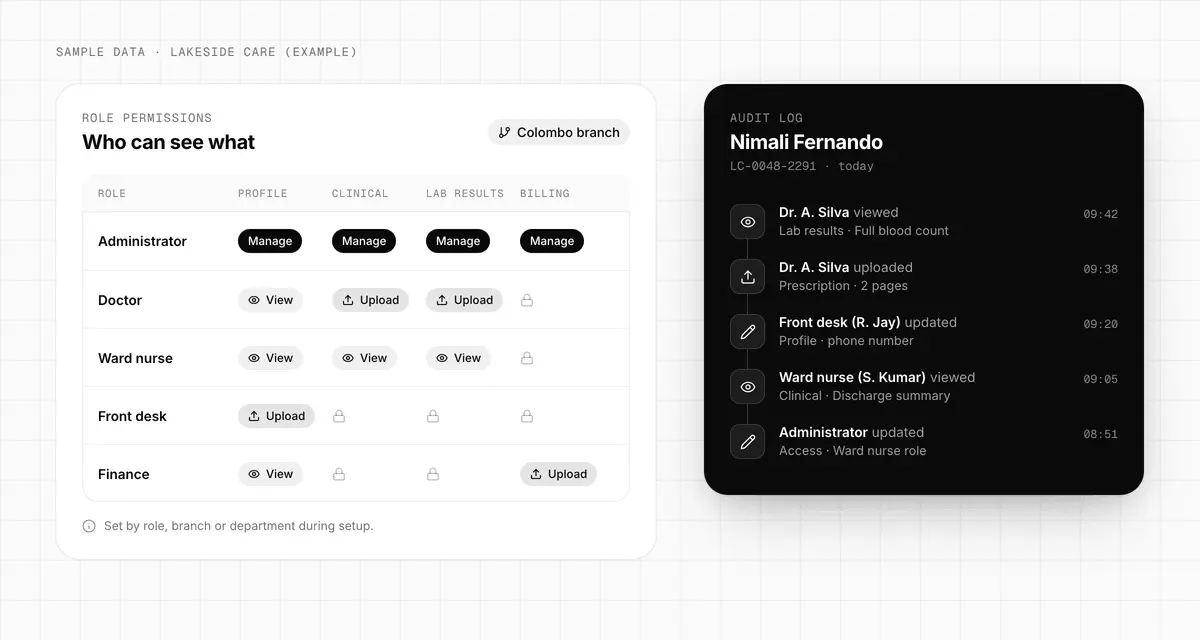
The right people see the right files. And you can prove it.
Not every team should see every document. Decide who can view, upload, verify or manage records, and keep a clear history of who opened or changed what.
- Permissions by role, team, branch or department
- View, upload, verify and manage rights set separately
- Every view and update recorded with who and when
- Growth without governance chaos as you add branches
Who it's for
Same platform, set up for your sector
Start with one sector and keep the same identity and vault underneath. These are the documents each team usually keeps in it.
Hospitals and clinics
A medical e-card with the patient's identity and clinical trail. Staff find verified records quickly, and sensitive files stay with the right team.
- Allergies
- Prescriptions
- Lab results
- Discharge documents
- Treatment history
Schools and universities
Student IDs with a vault for each student's records across departments, so requests and transfers stop causing rework.
- Certificates
- Transcripts
- Attendance and grades
- Admissions files
- Exam evidence
HR and enterprises
Employee IDs with a secure repository for every staff file. Access by role and department, and a clean path when auditors ask.
- Contracts
- Onboarding
- Policy acknowledgements
- Training certificates
- Compliance records
Insurance and finance
Policyholder identity with verification-ready evidence, updated over time, with a record of who accessed or changed what.
- KYC documents
- Claim history
- Verification evidence
How a rollout works
Pilot first. Then scale on the same platform.
A phased rollout keeps the risk small: prove it in one department or branch, then expand without rebuilding anything.
- 01
Discovery workshop
We map your document types, retention rules, workflows and access roles.
- 02
Identity model setup
We configure the profile, card fields, branch hierarchy and permission groups.
- 03
Pilot rollout
One site or department goes live. We train staff and check retrieval and data quality.
- 04
Scale deployment
We expand to every branch with migration support, usage dashboards and governance controls.
Packages
Quoted for your rollout stage
Start with a pilot or go straight to a wider rollout. We scope each package around your document volumes, access model and rollout complexity.
Best for one department or one branch
Pilot Package
Contact for pricing
Validate the concept with a focused rollout before scaling platform-wide.
- Identity profile and document vault setup
- Core role-based access configuration
- One workflow or department implementation
- Admin onboarding and pilot support
Best for growing organisations
Growth Package
Custom quote
Expand beyond the pilot with multi-team operations, stronger governance and rollout planning.
- Multi-branch or multi-department structure
- Document categories and lifecycle workflows
- Audit log and governance reporting setup
- Migration and rollout planning support
Best for regulated or high-scale environments
Enterprise Package
Tailored engagement
For organisations that need deeper customisation, controls and a long-term platform partner.
- Advanced permissions and process design
- Custom integrations and data modelling
- Multi-site governance and implementation advisory
- Dedicated solution planning with Ceytrex
What clients say about working with us
Reviews of Ceytrex custom software projects. The same team scopes and delivers ID Vault rollouts.
“Words cannot define how happy I am with their work. They actually went above and beyond and did more work than was expected. I truly appreciate them and highly recommend Ceytrex Labs. Very fast, very professional, and amazing work.”
“Outstanding service, really enjoyed working with the Ceytrex Labs team. Delivered ahead of schedule with excellent quality and clear documentation.”
Reviews collected directly from our clients.
FAQ
Questions buyers ask us
The fastest way forward is to define the pilot scope, users, document model and access rules together.
Ask us anythingIs Ceytrex ID Vault only for healthcare?
No. Healthcare is an easy starting point because the pain is obvious, but the same platform works for education, HR, insurance, finance, membership programmes and other document-heavy teams.
What does the digital ID card include?
Each person gets one profile with three parts: a physical ID card, a QR code on that card, and an online identity page. The identity page connects to the person's documents, and what a viewer can see depends on their role.
Can we start small before a full rollout?
Yes. We recommend a pilot for one department, branch or workflow first. Your team validates the document structure, access rules, staff adoption and reporting needs before a wider deployment.
Who can see a person's documents?
Only the roles you allow. Access can be set by role, team, branch or department, so a nurse, an HR officer and a finance clerk see different document categories. Every view and update is kept in an audit log that leadership and compliance teams can review.
Does ID Vault make us compliant with Sri Lanka's data protection law?
No software makes an organisation compliant on its own, and we don't claim any certification. ID Vault gives you controls that support your data protection work: role-based access, a log of who viewed or changed records, and document types and retention rules mapped with you in the discovery workshop.
Can you bring in our existing records?
Yes. Migration and rollout planning are part of the Growth and Enterprise packages: we plan which records move, in what order and into which document categories, then expand branch by branch.
Can it be customised or connected to our other systems?
Yes. The identity profile, document categories, workflows and permission structure are scoped around your organisation. Custom integrations and data modelling are part of the Enterprise package.
How much does ID Vault cost?
Every rollout is quoted. The price depends on the scope: how many people and branches, your document volumes, your access model and how complex the rollout is. The Pilot, Growth and Enterprise packages below show what each stage includes. Book a demo and we'll send a quote for your scope.

Start with one department. Scale when it works.
Book a demo and we'll walk through your documents, roles and branches, then scope a pilot. Planning, implementation and rollout support come from our team in Sri Lanka.
Pilot, Growth and Enterprise packages are all scoped with your team.